This blog is a static website built with Hugo on a theme I wrote myself. Everything lives in this GitHub repo.
The UI is intentionally minimalist. The content is the product here, and no fancy element should compete with it.
Why a static website
A blog has no sales to lose, but it has readers, and a slow page loses them before the first paragraph. A CMS, such as WordPress, is a common choice for blogs, but puts a runtime, a database, and a plugin ecosystem between the reader and the page. Those elements cost something on each web request, such as the time to render the page, or in maintenance, such as a backend to patch or an attack surface to protect. A static site pays those costs once, at build time, and then serves files; so there is nothing to break in production and nothing to break into. Google’s Why speed matters is an interesting reading on this topic.
Speed has to be measured, not assumed, and Yoast’s How to check site speed explains the tools to do it. One of those is PageSpeed, where the blog scores 89 on desktop and 67 on mobile. The server answers in under 100 milliseconds; the render-blocking third-party icon kit, web font, and jQuery are the problem, and the next thing to fix.
Project structure
content  theme  build system  generated

├── config.yaml                           Hugo configuration: site params, taxonomies, output formats
├── content/                              Markdown: the about page and the posts
│   └── posts/
│       └── Category1/                    a category
│           ├── _index.md                 its title and taxonomy
│           ├── PostTitle1.md             a post without assets
│           └── PostTitle2/               a post with assets, as a page bundle
│               ├── index.md              the post
│               ├── images/               figures, referenced as images/Image1.svg
│               └── code/                 source files, rendered with post-code
├── archetypes/                           front matter template for new posts
├── src/                                  theme source, compiled by Gulp
│   ├── views/                            Pug templates, custom shortcodes, SEO partial
│   ├── styles/                           SCSS
│   ├── scripts/                          client-side JavaScript
│   ├── images/                           brand assets, social image canvas, post images
│   ├── meta/                             robots.txt, web manifest, browser config
│   └── fonts/                            fonts for the social images
├── gulpfile.js                           stage one of the build
├── Makefile                              the entry points: build, serve, prod
├── .github/                              deploy workflow and pull request template
├── .pre-commit-config.yaml               pre-commit hooks: whitespace, YAML, file size
├── layouts/                              generated from src/views, gitignored
├── static/                               generated from src/, gitignored
├── assets/                               generated from src/fonts and src/images, gitignored
└── public/                               the built site, gitignored
The generated directories are gitignored and never edited by hand.
A post is a single Markdown file, or a page bundle when it ships its own files; Hugo publishes those under the post’s URL, which is the same in both forms.
Hugo serves static/ verbatim and treats assets/ as inputs to its own pipeline, in this case the fonts and the canvas for the social images; Gulp fills both.
The Hugo documentation describes what each of these directories means to Hugo.
The build pipeline
The build has two stages.
First, Gulp turns the theme source under src/ into the files Hugo expects. The Pug partials become the HTML layouts, the SCSS partials become the minified stylesheet, images and scripts are optimized and copied over.
Then, Hugo combines the Markdown under content/ with those layouts and assets into the final site. It also generates a social preview image per post by overlaying the title on the brand canvas, an SVG under src/images/brand/ that Gulp rasterizes, so no post needs a hand-made one.
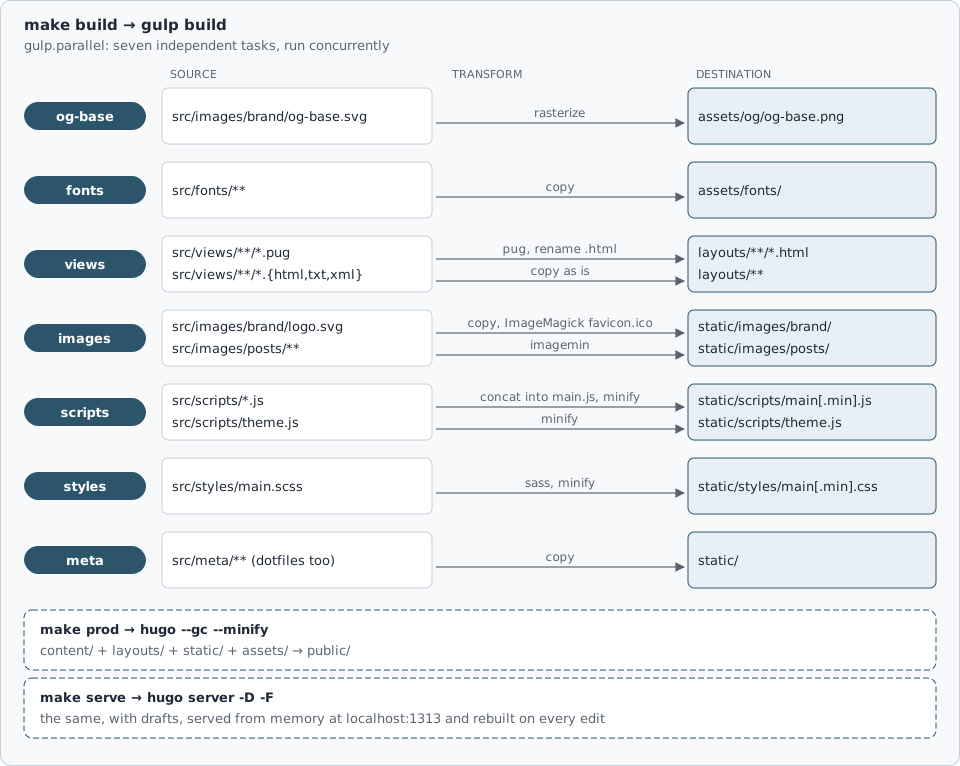
Every page carries its own metadata: canonical URL, Open Graph and X cards, and schema.org structured data as JSON-LD, all derived from the front matter.
The site also publishes an llms.txt index, following the llms.txt proposal, so an AI agent gets a map of the content without crawling it.
Deployment
The site is hosted on GitHub Pages as a user site: the repository is named gmarciani.github.io, so GitHub serves it at the root of that domain with its own TLS certificate.
Every push to main triggers the deploy workflow, that builds the website for production and publishes it.
Two incidents are possible. (i) A failed build never reaches production, so readers keep seeing the previous site. In this case, the deployment workflow would be simply retried, as it is idempotent. (ii) An unexpected publication does reach them. In this case, pushing a reverting commit would solve.
Licensing
Code and content are released under different licenses, because the intent differs: permissive on code, copyleft on prose.
The theme and build pipeline are software, released under the MIT license so that anyone can fork the repository, delete content/, and have a working blog.
The posts need a different license because they are not code, but personal opinions I want to be quoted, translated, and built upon with attribution, but not sold, and I want derivatives to stay open. Creative Commons BY-NC-SA 4.0 is written for creative works, says exactly those three things, attribution, non-commercial, share-alike, and is what publishers and translators recognize on sight.
Custom shortcodes
A shortcode is a template you call from Markdown, for anything Markdown cannot express on its own. Hugo provides some built-in shortcodes for standard embeds, such as YouTube videos or Instagram posts. My theme adds five of its own:
epigraphsets an opening quotation: centered, italic, muted.filetreeprints a directory tree as a code block with two things a fenced code block cannot carry: bold and colored entries.post-coderenders a source file that ships with the post, from thecode/folder of its page bundle, with highlighting and a download link.ghcodefetches a source file from GitHub at build time and renders it with syntax highlighting. The embed is a snapshot taken at build time.ghactivityrenders a GitHub contribution chart for a username. It is a link to the profile wrapping an image served by ghchart.
Appendix: What Hugo renders
What follows is a live showcase of embeds and shortcodes supported by the blog them. When I modify my shortcodes, I use this age to validate the outcome.
Links
Cross-references use Hugo’s ref shortcode, validated at build time: Hello World.
Formulas
Formulas render in the browser with MathJax:
$$\int_{a}^{b} x^2 dx$$
Figures

Unlike ref, Markdown image links aren’t validated at build time; a broken one shows the browser’s missing-image state instead of failing the build, as below:

YouTube
X
What if your computer could help scientists fight COVID-19... and future pandemics?https://t.co/VvugPxYyd5 pic.twitter.com/C28IjZdHnc
— Giacomo Marciani (@giacomomarciani) April 6, 2020
Code Blocks
public static void main(String[] args) {
    System.out.println("Hello world!");
}
Shortcode: epigraph
“Simplicity is prerequisite for reliability.”
Edsger W. Dijkstra
Shortcode: filetree
The filetree shortcode, with bold and colored entries:
├── index.md          the post
├── images/
│   └── Image1.svg        a figure
└── code/
    └── Snippet1.py       a snippet
Shortcode: post-code
# A snippet shipped with the post, rendered by the post-code shortcode.
print("Hello World!")
Shortcode: ghcode
# Activate the .nvmrc Node version when nvm is present, installing it if
# needed (CI runners ship nvm without our version); no-op where nvm is absent
# and Node is already on PATH.
NVM_USE = if [ -f "$${HOME}/.nvm/nvm.sh" ]; then . "$${HOME}/.nvm/nvm.sh" && nvm install; fi

.PHONY: clean build serve watch prod install

## Install requirements: Homebrew packages, Node from .nvmrc, npm dependencies
## (Dart Sass comes from the npm `sass` dependency, so it needs no brew formula)
install:
	brew install hugo imagemagick
	. "$${HOME}/.nvm/nvm.sh" && nvm install && npm install

## Delete generated directories and files
clean:
	$(NVM_USE) && npm run clean

## Build assets (Gulp: views, fonts, images, scripts, styles, meta)
build:
	$(NVM_USE) && npm install && npm run build

## Start Hugo dev server with drafts
serve: build
	$(NVM_USE) && npm run serve

## Gulp watch for live asset rebuilds
watch: build
	$(NVM_USE) && npm run watch

## Production Hugo build with minification
prod:
	$(NVM_USE) && npm install && npm run prod